Creating Templates
If installed, create a .json file and place it in
C:\Users\{user}\AppData\Local\Pihitan\templates
If ran through jar, just place it in the same directory.
Template format
A template is a json file in the following format
  {
    "id": "Display Name",
    "windowName": "Archetype Plini X", // Needed for autodetection
    "color": [ 0, 0.5, 0.7, 1], // [ r, g, b, a ] max value is 1, used in highlight and wireframe
    "author": "pihitan", // displayed on start
    ...
    "sections": [  // Array of sections
      {
        "id": "pre-fx", // Section details
        ...
        "items": [ // Array of items
          {
            "id": "compressor", // item details
            "type": "GEAR",
            "pos": {
              "x": 15,
              "y": 70
            },
            ... // items may contain items
        ]
      }
    ]
  }
upper left corner as x = 0, y = 0. Here are some examples of points in the grid.
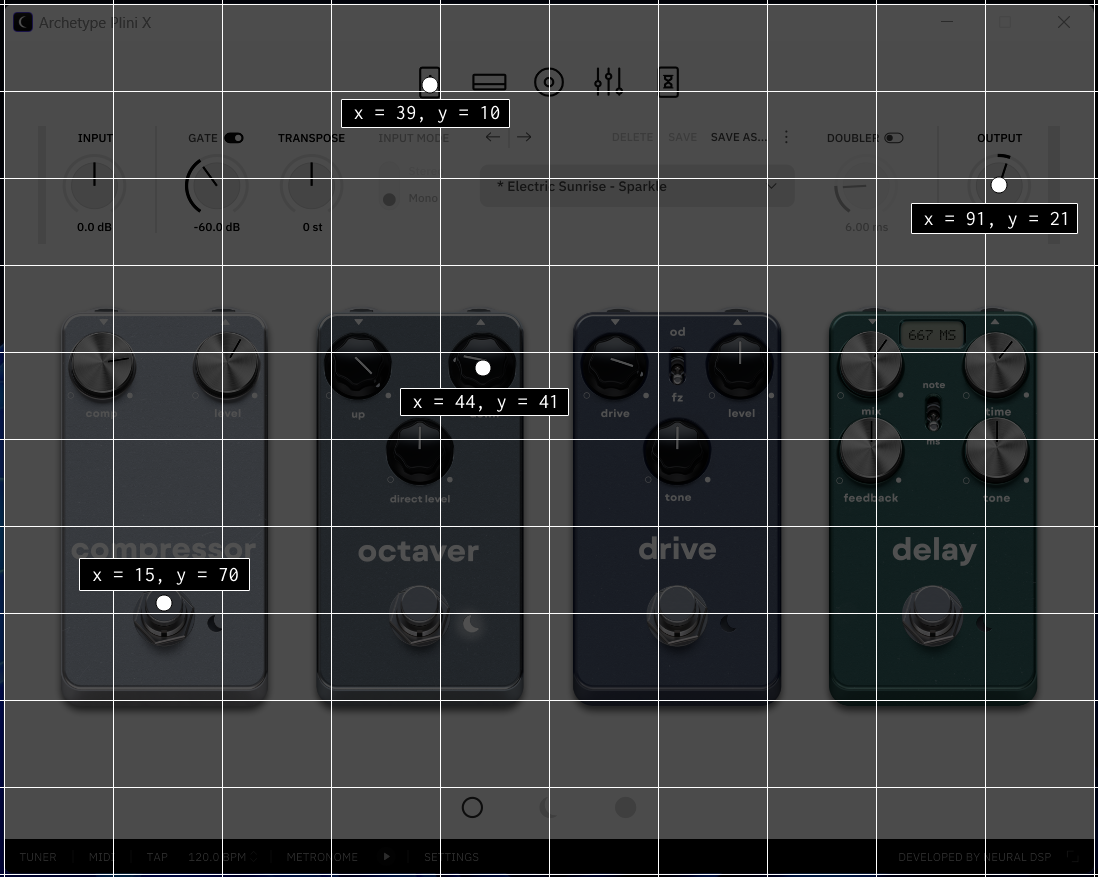
  {
    "id": "program id", // display name
    ...
    "nextPreset": {
      "x": 48,
      "y": 15
    },
    "prevPreset": {
      "x": 45,
      "y": 15
    },
    ...
  }
sections. It is an array of objects. Each object has the following:
  {
    ...
      "id": "amp-clean",  // this will be displayed on screen
      "pos": {  // position that will be clicked
        "x": 39,
        "y": 10
      },
      "preStep": { // optional, this will be clicked after pos
        "x": 45,   // used in amp selectors
        "y": 10
      },
      "items": [ ... ] // will discuss in the next section
    ...
  }
items.
  {
    "id": "gain", // will be displayed as {section}:{item-id}
    "type": "GEAR", // Can be KNOB, TOGGLE, GEAR
    "pos": { // Position
      "x": 25,
      "y": 74
    },
    "items": [...] // Optional, only defined when type is GEAR
  },
- KNOB - Sending
presshere will click the mouse on the containing item'spos - TOGGLE - Sending
presshere will click the mouse in place - GEAR - This item will not be navigated. A GEAR type is expected to have items inside it. The position of this GEAR item will determine the
pressposition of the items inside it.
item declaration for a drive/effects pedal.
  {
    "id": "drive",
    "type": "GEAR",
    "pos": {
      "x": 62,
      "y": 70
    },
    "items": [
      {
        "id": "drive",
        "type": "KNOB",
        "pos": {
          "x": 55,
          "y": 41
        }
      },
      {
        "id": "od/fuzz",
        "type": "TOGGLE",
        "pos": {
          "x": 62,
          "y": 41
        }
      },
      {
        "id": "tone",
        "type": "KNOB",
        "pos": {
          "x": 62,
          "y": 52
        }
      }
    ]
  }
drive, pressing space will make the program click on the parent item pos x = 62, y = 70
If currently in
od/fuzz, pressing space will press on x = 62, y = 41 instead.
plini-x.json template that is included in the installation as a template / guide. Please consider sharing your templates. Thanks!